Thursday, November 7, 2019

LOOPS IN PYTHON.

ITERATION/LOOPING.

Repeating identical or similar tasks without making errors is something that computers do well and people do poorly. Repeated execution of a set of statements is called iteration. Because iteration is so common, Python provides several language features to make it easier.


Python programming language provides the following types of loops to handle looping requirements. Python provides three ways for executing the loops. While all the ways provide similar basic functionality, they differ in their syntax and condition checking the time.
While Loop:
  • In python, while loop is used to execute a block of statements repeatedly until a given a condition is satisfied. And when the condition becomes false, the line immediately after the loop in the program is executed.
  • Syntax :
while expression:

       statement(x)


All the statements indented by the same number of character spaces

 after a programming construct are considered to be part of a single

 block of code. Python uses indentation as its method of grouping

statements.

Example:

# Python program to illustrate 

# while loop 
count = 0
while (count < 3):  
count = count + 1
print("Hello ") 

output:
hello
hello
hello

Using else statement with while loops: As discussed above, while

 loop executes the block until a condition is satisfied. When the 

condition becomes false, the statement immediately after the loop

 is executed.

The else clause is only executed when your while condition 

becomes false. If you break out of the loop, or if an exception is 

raised, it won’t be executed.

If else like this:


if condition: 


# execute these statements 

else: 

# execute these statements 

and while loop like this is similar


while condition: 
# execute these statements 
else: 
# execute these statements 


#Python program to illustrate 
# combining else with while 
count = 0
while (count < 3):  
count = count + 1
print("Hello ") 
else: 
print("In Else Block") 

output:
Hello
Hello
Hello
In Else Block

Single statement while block: Just like the if block, if the while 

block consists of a single statement we can declare the entire 

loop in a single line as shown below:


# Python program to illustrate 

# Single statement while the block 
count = 0
while (count == 0): print("Hello Geek") 


Note: It is suggested not to use this type of loops as it is a never-ending infinite loop where the condition is always true and you have to forcefully terminate the compiler.
See this for an example where while loop is used for iterators. As mentioned in the article, it is not recommended to use a while loop for iterators in python.
for loop: For loops are used for sequential traversal. For example: traversing a list or string or array etc. In Python, there is no C style for loop, i.e., for (i=0; i<n; i++). There is a “for in” loop which is similar to for each loop in other languages. Let us learn how to use for in loop for sequential traversals.
Syntax:
for iterator_variable in sequence:
           statement(s)

It can be used to iterate over iterators and a range.

# Python program to illustrate 

# Iterating over a list 

print("List Iteration") 

l = ["pari", "for","paritosh"]

for i in l: 

print(i) 

# Iterating over a tuple (immutable) 

print("\nTuple Iteration") 

t = ("paritosh","for","paritosh")

for i in t: 

print(i) 

# Iterating over a String 

print("\nString Iteration")  

s = "paritosh"

for i in s : 

print(i) 

# Iterating over dictionary 

print("\nDictionary Iteration") 

d = dict() 

d['xyz'] = 123

d['abc'] = 345

for i in d : 

print("%s %d" %(i, d[i])) 


output:

List iteration
pari
for
Paritosh

Tuple iteration
Paritosh
for
Paritosh


string iteration
p
a
r
i
t
o
s
h

dictionary iteration
XYZ  123
ABC  345


Iterating by an index of sequences: We can also use the index of 

elements in the sequence to iterate. The key idea is to first calculate

 the length of the list and in iterate over the sequence within the 

range of this length.

See the below example:

# Python program to illustrate 

# Iterating by index 

list = ["paritosh","for","paritosh"]

for index in range(len(list)): 

print list[index] 

output:

Paritosh

for 

Paritosh


Using else statement with for loops: We can also combine else 

statement with for loop like in while loop. But as there is no 

condition in for loop based on which the execution will terminate 

so the else block will be executed immediately after for block

 finishes execution.

Below example explains how to do this:

# Python program to illustrate 
# combining else with for 

list = ["paritosh","for","paritosh"]
for index in range(len(list)): 
print list[index] 
else: 
print "Inside Else Block"
output:

paritosh

for

paritosh

Inside Else Block


We can use for in loop for user-defined iterators. See this for example.
Nested Loops: Python programming language allows to use one

 loop inside another loop. The following section shows a few

examples to illustrate the concept.


Syntax:

for iterator_var in sequence: 
statements(s) 
statements(s) 


The syntax for a nested while loop statement in Python

programming language is as follows:

while expression: 
while expression: 
statement(s) 
statement(s) 


A final note on loop nesting is that we can put any type of loop 

inside of any other type of loop. For example, a for loop can be 

inside a while loop or vice versa.


# Python program to illustrate 

# nested for loops in Python 

from __future__ import print_function 

for i in range(1, 5): 

for j in range(i): 

print(i, end=' ') 

print() 

output:

1
2  2
3  3  3
4  4  4  4


Loop Control Statements: Loop control statements change 

execution from its normal sequence. When execution leaves a 

scope, all automatic objects that were created in that scope are 

destroyed. Python supports the following control statements.


Continue Statement: It returns the control to the beginning of the 

loop.


# Prints all letters except 'e' and 's' 


for letter in 'paritosh singh':

if letter == 'e' or letter == 's': 

continue

print 'Current Letter :', letter 

var = 10

Break Statement: It brings control out of the loop.


for letter in 'Paritosh':

# break the loop as soon it sees 'e' 

# or 's' 

if letter == 'e' or letter == 's': 

break

print 'Current Letter :', letter 


Pass Statement: We use pass statement to write empty loops. Pass 

is also used for empty control statements, functions and classes.


# An empty loop 
for letter in 'paritosh':
pass
print 'Last Letter :', letter 


Exercise: How to print a list in reverse order (from last to the first item) using while and for-in loops.
PURPOSE OF LOOPING:
 loop in python is used to execute a block of statements or code several times until the given condition becomes false. We use for loop when we know the number of times to iterate. Here var will take the value from the sequence and execute it until all the values in the sequence are done.

FLOATING POINT REPRESENTATION.

Python | Float type and its methods.

The float type in Python represents the floating-point number. Float is used to represent real numbers and is written with a decimal point dividing the integer and fractional parts. For example, 97.98, 32.3+e18, -32.54e100 all are floating-point numbers.
Python float values are represented as 64-bit double-precision values. The maximum value any floating-point number can be is approx 1.8 x 10308. Any number greater than this will be indicated by the string inf in Python.

# Python code to demonstrate float values. 
print(1.7e308) 
# greater than 1.8 * 10^308 
# will print 'inf' 
print(1.82e308) 
OUTPUT:
1.7e+308
inf
Floating-point numbers are represented in computer hardware as base 2 (binary) fractions. For example, the decimal fraction 0.125 has value 1/10 + 2/100 + 5/1000, and in the same way the binary fraction 0.001 has value 0/2 + 0/4 + 1/8. These two fractions have identical values, the only real difference being that the first is written in base 10 fractional notation, and the second in base 2.
Unfortunately, most decimal fractions cannot be represented exactly as binary fractions. A consequence is that, in general, the decimal floating-point numbers you enter are only approximated by the binary floating-point numbers actually stored in the machine.
The type implements the abstract base class. Returns an expression which is converted into floating-point number. float also has the following additional methods:
float.as_integer_ratio() : Returns a pair of integers whose ratio is exactly equal to the actual float having a positive denominator. In the case of infinite, it raises overflow error and value errors on Not a number (NaNs).
# Python3 program to illustrate 
# working of float.as_integer_ratio() 
def frac(d): 
# Using as_integer_ratio 
b = d.as_integer_ratio() 
return b 
# Driver code 
if __name__=='__main__': 
b = frac(3.5) 
print(b[0], "/", b[1]) 
OUTPUT:
7/2
float.is_integer() : Returns True in case the float instance is finite with integral value, else, False.
# Python3 program to illustrate 
# working of float.is_integer() 

def booln(): 
# using is_integer 
print((-5.0).is_integer()) 
print((4.8).is_integer()) 
print(float.is_integer(275.0)) 

# Driver code 
if __name__=='__main__': 
booln() 

OUTPUT:
True
False
True

float.hex() : Returns a representation of a floating-point number as a hexadecimal string.
# Python3 program to illustrate 
# working of float.hex() 

def frac(a): 
# using float.hex() 
a = float.hex(35.0) 
return a 
# Driver code 
if __name__=='__main__': 
b = frac(35.0) 
print(b) 

output:
0*1.180000000000p+5


float.from hex(s): Returns the float represented by a hexadecimal string s. String s may have leading and trailing whitespaces.


# Python3 program to illustrate 
# working of float.fromhex() 

def frac(a): 
# using a float.fromhex() 
a = float.fromhex('0x1.1800000000000p+5') 
return a 
# Driver code  
if __name__=='__main__': 
b = frac('0x1.1800000000000p+5') 
print(b) 

OUTPUT:
35.0

Note : float.hex() is an instance method, but float.fromhex() is a class method.


CONDITIONALS IN PYTHON.


Decision Making in Python (if , if..else, Nested if, if-elif)

There comes situations in real life when we need to make some decisions and based on these decisions, we decide what should we do next. Similar situations arises in programming also where we need to make some decisions and based on these decision we will execute the next block of code.
Decision making statements in programming languages decides the direction of flow of program execution. Decision making statements available in python are:
if-elif ladder
if statement

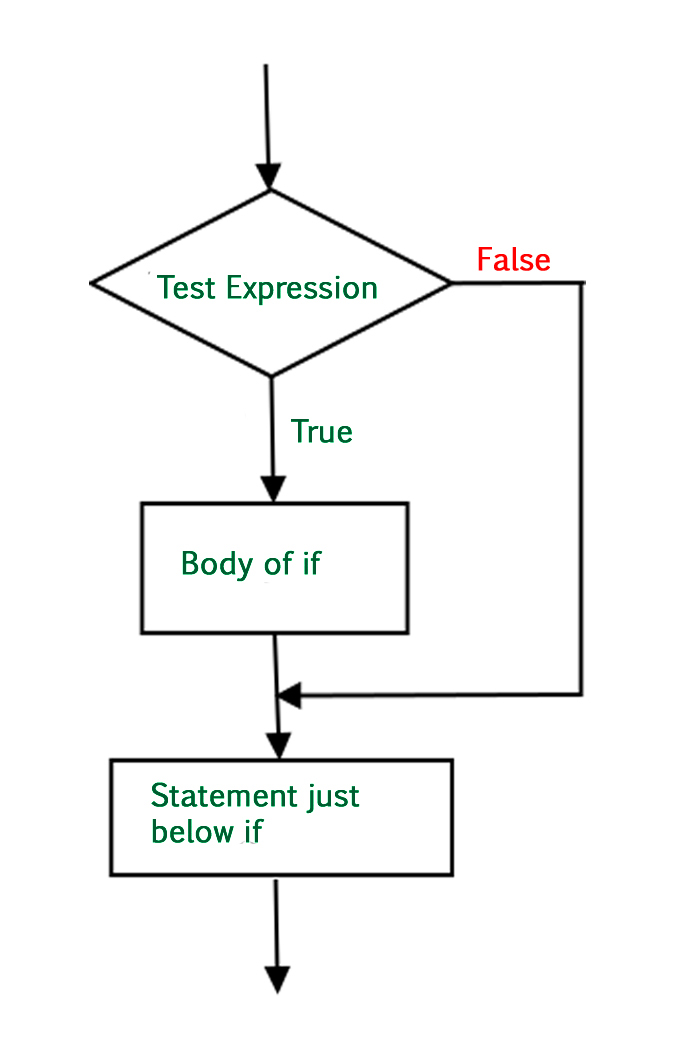
if statement is the most simple decision making statement. It is used to decide whether a certain statement or block of statements will be executed or not i.e if a certain condition is true then a block of statement is executed otherwise not.
Syntax:
if condition: # Statements to execute if # condition is true
Here, condition after evaluation will be either true or false. if statement accepts boolean values – if the value is true then it will execute the block of statements below it otherwise not. We can use condition with bracket ‘(‘ ‘)’ also.
As we know, python uses indentation to identify a block. So the block under an if statement will be identified as shown in the below example:
if condition: statement1 statement2 # Here if the condition is true, if block # will consider only statement1 to be inside # its block.
Flowchart:-
if-statement-in-java
# python program to illustrate If statement 
i = 10
if (i > 15): 
print ("10 is less than 15") 
print ("I am Not in if") 
OUTPUT:
I am Not in if
As the condition present in the if statement is false. So, the block below the if statement is not executed.

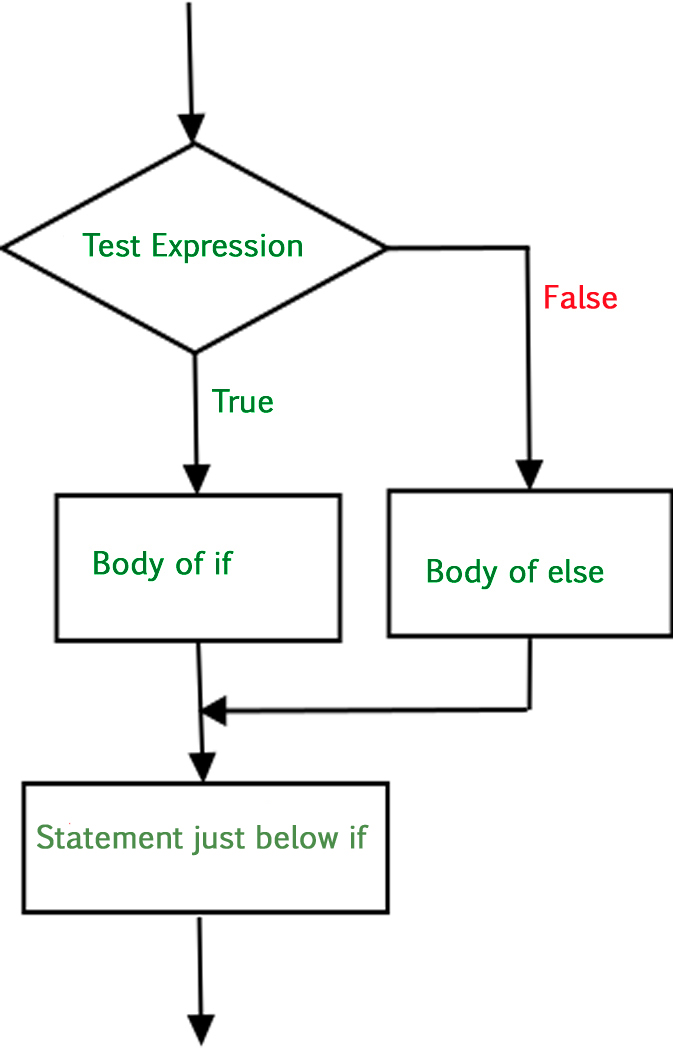
The if statement alone tells us that if a condition is true it will execute a block of statements and if the condition is false it won’t. But what if we want to do something else if the condition is false. Here comes the else statement. We can use the else statement with if statement to execute a block of code when the condition is false. Syntax:
if (condition):
    # Executes this block if
    # condition is true
else:
    # Executes this block if
    # condition is false
Flow Chart:-
if-else-statement
# python program to illustrate If else statement 
i = 20; 
if (i < 15): 
print ("i is smaller than 15") 
print ("i'm in if Block") 
else: 
print ("i is greater than 15") 
print ("i'm in else Block") 
print ("i'm not in if and not in else Block") 
OUTPUT:
i is greater than 15
i'm in else Block
m not in if and not in else Block

The block of code following the else statement is executed as the condition present in the if statement is false after call the statement which is not in block(without spaces).
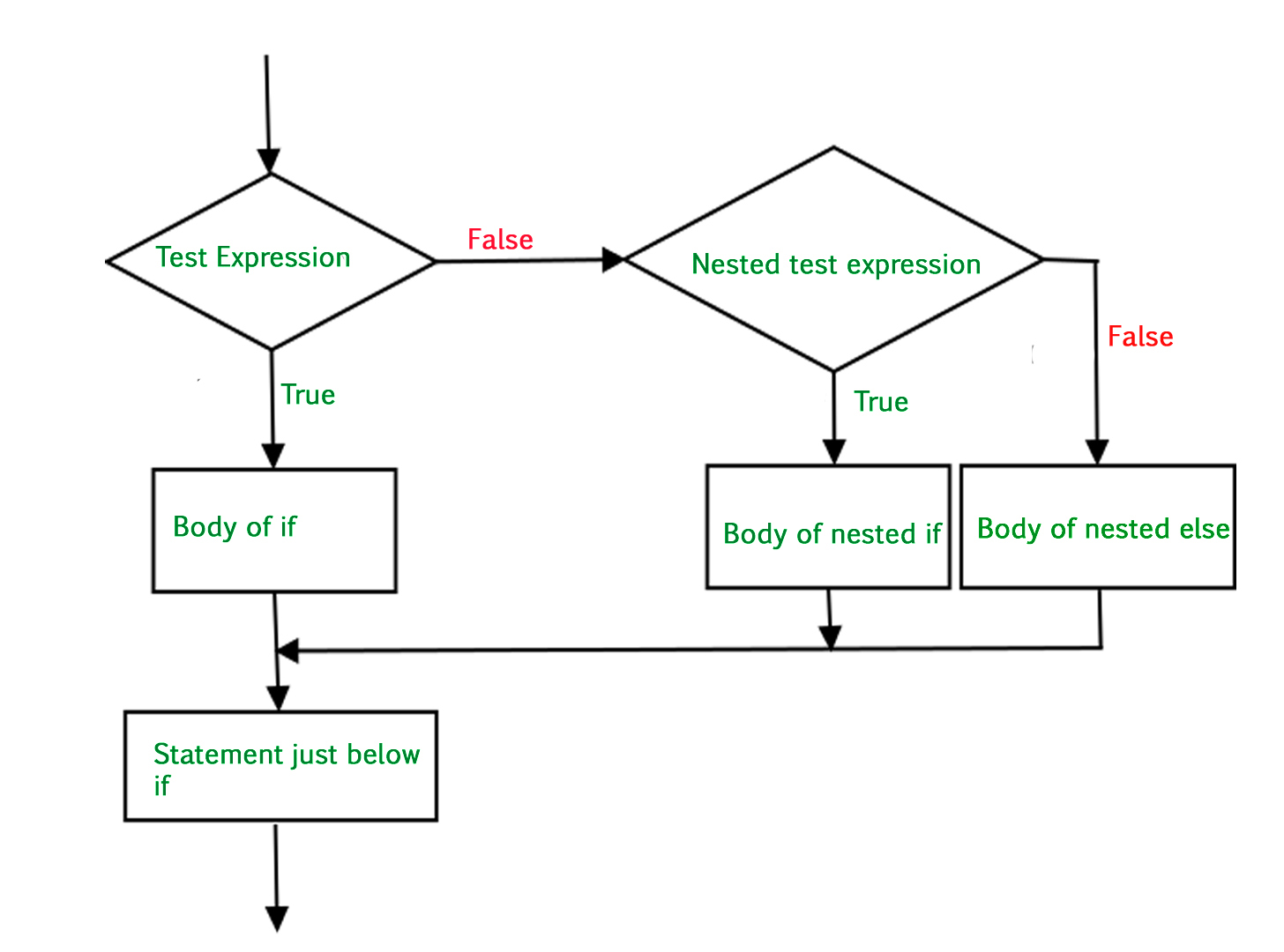
A nested if is an if statement that is the target of another if statement. Nested if statements means an if statement inside another if statement. Yes, Python allows us to nest if statements within if statements. i.e, we can place an if statement inside another if statement.
Syntax:
if (condition1):
# Executes when condition1 is true
if (condition2):
# Executes when condition2 is true
# if Block is end here
Flow chart:-
nested-if
# python program to illustrate nested If statement 
i = 10
if (i == 10): 
# First if statement 
if (i < 15): 
print ("i is smaller than 15") 
# Nested - if statement 
# Will only be executed if statement above 
# it is true 
if (i < 12): 
print ("i is smaller than 12 too") 
else: 
print ("i is greater than 15") 
OUTPUT:
i is greater than 15
i is smaller than 12 too
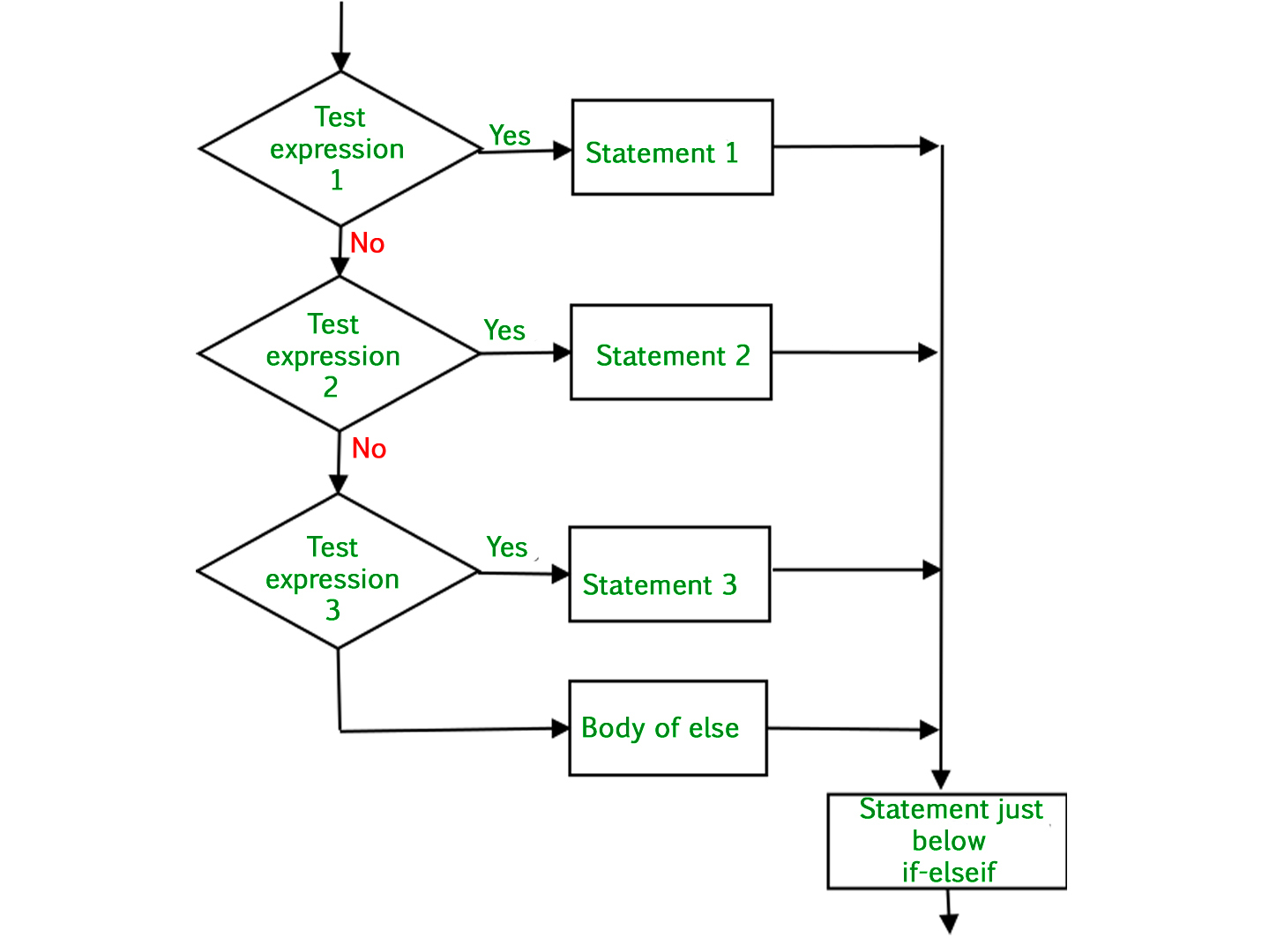
Here, a user can decide among multiple options. The if statements are executed from the top down. As soon as one of the conditions controlling the if is true, the statement associated with that if is executed, and the rest of the ladder is bypassed. If none of the conditions is true, then the final else statement will be executed.
Syntax:-
if (condition):
statement
elif (condition):
statement . . else:
statement
Flow Chart:-
if-else-if-ladder
# Python program to illustrate if-elif-else ladder  
i = 20
if (i == 10): 
print ("i is 10") 
elif (i == 15):
print ("i is 15") 
elif (i == 20): 
print ("i is 20") 
else: 
print ("i is not present") 
OUTPUT:
i is 20.
THATS ALL ABOUT BASIC CONDITIONING.

LOOPS IN PYTHON.

ITERATION/LOOPING. Repeating identical or similar tasks without making errors is something that computers do well and people do poorly. Repe...

recent one